> ## Documentation Index
> Fetch the complete documentation index at: https://docs.trainy.ai/llms.txt
> Use this file to discover all available pages before exploring further.
# Run Forking
> Branch from an existing run at a specific step to explore training variations without starting from scratch.
Run forking is a **preview feature**. The `pluto-ml` API and UI may change in future releases. Have feedback? Email us at [support@trainy.ai](mailto:support@trainy.ai) or file a Github Issue [here](https://github.com/Trainy-ai/pluto/issues).
# Run Forking
Run forking lets you create a new run that branches from an existing run at a specific training step. Forked runs share the same experiment names as it's ancestors and descendants. The forked run inherits the parent's metric history up to the fork point, so you can explore hyper-parameter changes, architecture tweaks, or different data mixes without re-running earlier steps or editing the existing run.
This is useful when you want to:
* Try a different learning rate starting from a checkpoint mid-training
* Compare multiple variations of a run from the same starting point
* Resume training with modified config without losing the original run's data
## Forking via the SDK
Pass `fork_run_id` and `fork_step` to `pluto.init()` to fork from an existing run:
```python theme={null}
import pluto
run = pluto.init(
project="my-project",
name="lr-sweep-v2",
fork_run_id="MMP-42", # Display ID or numeric ID of the parent run
fork_step=500, # Step to fork at
inherit_config=True, # Inherit parent's config (default: True)
inherit_tags=False, # Inherit parent's tags (default: False)
config={"lr": 0.001}, # Override specific config keys
)
# Check fork metadata
print(f"Forked from run {run.fork_run_id} at step {run.fork_step}")
# Continue training from the fork point
for step in range(500, 1000):
run.log({"loss": 0.4, "lr": 0.001})
run.finish()
```
Both `fork_run_id` and `fork_step` are required together — providing one without the other raises a `ValueError`.
### Parameters
| Parameter | Type | Default | Description | |
| ---------------- | ------ | ------- | -------------------------------------------------------------------------------------------------------------- | ------------------------------------------------------------------------------------------------------------- |
| `fork_run_id` | \`int | str\` | `None` | ID of the parent run to fork from. Accepts a numeric run ID (e.g. `12345`) or a display ID (e.g. `"MMP-42"`). |
| `fork_step` | `int` | `None` | Step number at which to fork. Must be within the parent run's logged step range. | |
| `inherit_config` | `bool` | `True` | Copy the parent run's config to the forked run. See [Config and Tag Inheritance](#config-and-tag-inheritance). | |
| `inherit_tags` | `bool` | `False` | Copy the parent run's tags to the forked run. See [Config and Tag Inheritance](#config-and-tag-inheritance). | |
### Properties
After initialization, the `Run` object exposes two read-only properties:
```python theme={null}
run.fork_run_id # Resolved parent run ID (int or None)
run.fork_step # Fork step (int or None)
```
`fork_run_id` on the response may differ from the value you passed in. The server resolves the lineage chain to find the ancestor that owns the requested step. See [Lineage Resolution](#lineage-resolution) below.
## Chart Visualization
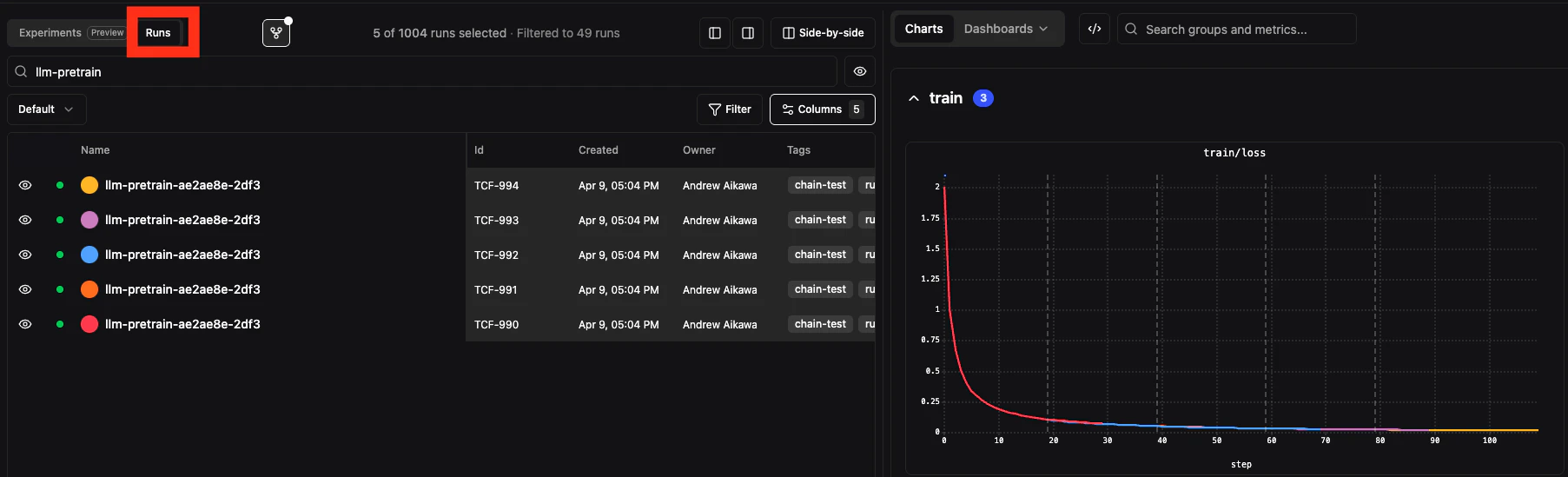
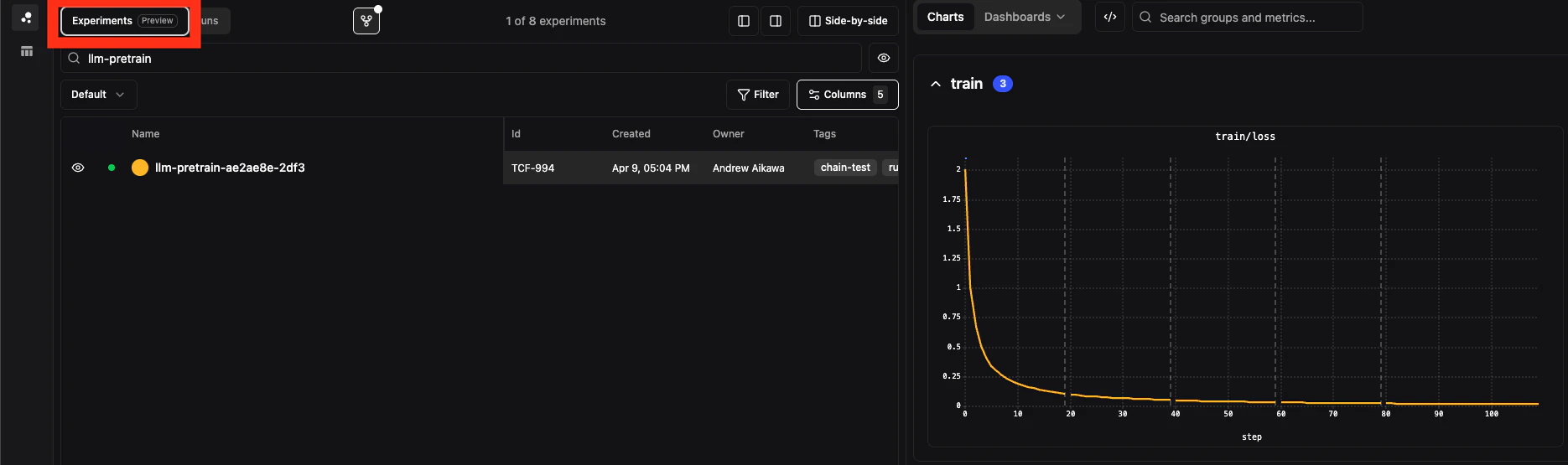
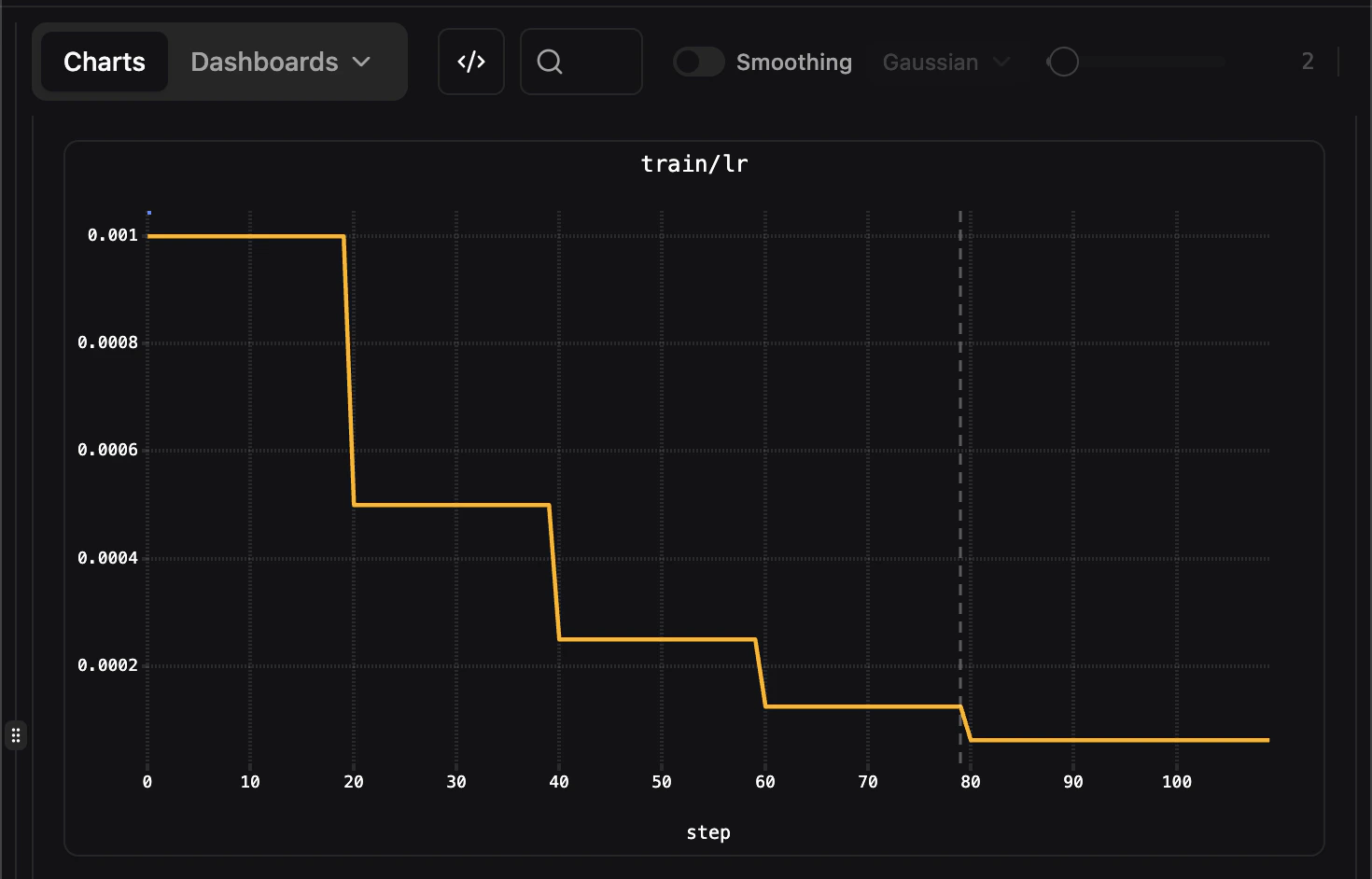
In the Pluto app, you can either view the runs individually or grouped by experiment name/linearge as one continuous graph. Compare the following graphs showing each run as a different color versus the runs grouped as a single experiment and color and showing the fork boundary.
 ## Forked Run Inheritance
When you fork a run, the following data is carried over.
| Data | Inherited? | Notes |
| -------------- | ------------- | ----------------------------------------------------------------------------------- |
| Config | Yes (default) | Controlled by `inherit_config`. If `true`, child and parent configs are merged. |
| Tags | No (default) | Controlled by `inherit_tags`. If `true`, child and parent configs are merged. |
| Metrics | At query time | Parent metrics up to `fork_step` are displayed along with the child's chart series. |
| Logs | No | The forked run starts with a clean log. |
| Files | No | The forked run has its own file storage. |
| System metrics | No | GPU, memory, etc. are tracked independently. |
### Config and Tag Inheritance
Inherited config and tags are written to the child run's own records.
| Parameter | Default | Behavior when enabled |
| ---------------- | ------- | ------------------------------------------------------------------------------------------------------------------------------------------------------------------------------------------------------------------------------------------------------------------ |
| `inherit_config` | `True` | Child run receives the parent's config. If you also pass a `config` dict, your keys are **deep-merged** into the parent's — nested objects merge recursively and your values take precedence at each leaf. Otherwise, the child gets the parent's config entirely. |
| `inherit_tags` | `False` | Child run receives the parent's tags. If you also pass `tags`, the inherited and explicit tags are combined and deduplicated. |
Since `inherit_config` defaults to `True`, forking without passing any config always gives you the parent's config. Since `inherit_tags` defaults to `False`, tags are **not** inherited unless you explicitly pass them in.
Inheritance resolves from the [lineage-resolved parent](#lineage-resolution), not necessarily the direct parent you specify. If your `fork_step` falls within an ancestor further up the chain, the config and tags come from that ancestor.
### Metrics Stitching
Metrics are not copied when forking but instead with a forked run. Instead, when rendering charts, the frontend determines lineage chain for runs with a matching name and combines metric data across ancestors using step ranges:
* **Parent run**: steps 0 through `fork_step`
* **Forked run**: steps after `fork_step` onward
This produces a seamless, continuous series in the chart — the forked run's line appears to continue directly from the parent's data.
## Forked Run Inheritance
When you fork a run, the following data is carried over.
| Data | Inherited? | Notes |
| -------------- | ------------- | ----------------------------------------------------------------------------------- |
| Config | Yes (default) | Controlled by `inherit_config`. If `true`, child and parent configs are merged. |
| Tags | No (default) | Controlled by `inherit_tags`. If `true`, child and parent configs are merged. |
| Metrics | At query time | Parent metrics up to `fork_step` are displayed along with the child's chart series. |
| Logs | No | The forked run starts with a clean log. |
| Files | No | The forked run has its own file storage. |
| System metrics | No | GPU, memory, etc. are tracked independently. |
### Config and Tag Inheritance
Inherited config and tags are written to the child run's own records.
| Parameter | Default | Behavior when enabled |
| ---------------- | ------- | ------------------------------------------------------------------------------------------------------------------------------------------------------------------------------------------------------------------------------------------------------------------ |
| `inherit_config` | `True` | Child run receives the parent's config. If you also pass a `config` dict, your keys are **deep-merged** into the parent's — nested objects merge recursively and your values take precedence at each leaf. Otherwise, the child gets the parent's config entirely. |
| `inherit_tags` | `False` | Child run receives the parent's tags. If you also pass `tags`, the inherited and explicit tags are combined and deduplicated. |
Since `inherit_config` defaults to `True`, forking without passing any config always gives you the parent's config. Since `inherit_tags` defaults to `False`, tags are **not** inherited unless you explicitly pass them in.
Inheritance resolves from the [lineage-resolved parent](#lineage-resolution), not necessarily the direct parent you specify. If your `fork_step` falls within an ancestor further up the chain, the config and tags come from that ancestor.
### Metrics Stitching
Metrics are not copied when forking but instead with a forked run. Instead, when rendering charts, the frontend determines lineage chain for runs with a matching name and combines metric data across ancestors using step ranges:
* **Parent run**: steps 0 through `fork_step`
* **Forked run**: steps after `fork_step` onward
This produces a seamless, continuous series in the chart — the forked run's line appears to continue directly from the parent's data.
 ### Fork Step Annotations
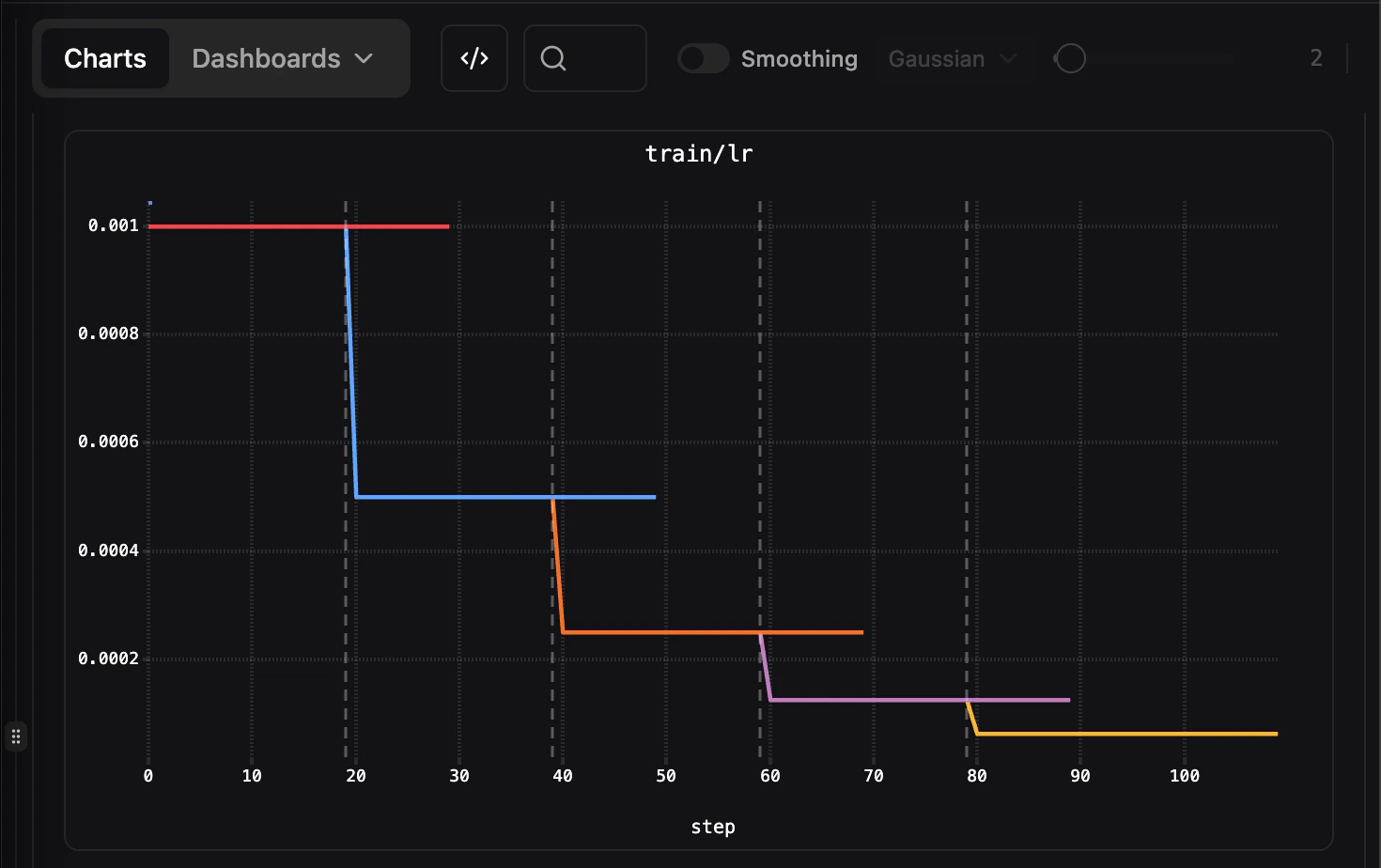
Charts display a vertical dashed line at the fork step boundary when comparing raw runs, making it easy to see where the forked run diverges from its parent.
### Show Inherited Datapoints
Use the **Show inherited datapoints** toggle in the toolbar (the fork icon) to control whether forked runs display the parent's metrics before the fork point. This is enabled by default.
In the comparison view (multi-run charts), each run displays only its own data points. Lineage stitching applies to the individual run detail view.
## Lineage Resolution
For example, consider this lineage:
1. `Run A` logs steps 0-100.
2. `Run B` forks `Run A` at step 50, and then logs steps 51-200.
3. `Run C` forks `Run B` at step 150.
If you then fork `Run C`, the parent is resolved to the run that originally owns the `fork_step`:
* Forking `Run C` at **step 75** resolves to **Run B** as the parent (since B owns steps 51-200).
* Forking `Run C` at **step 30** resolves to **Run A** as the parent (since A owns steps 0-100).
### Fork Step Annotations
Charts display a vertical dashed line at the fork step boundary when comparing raw runs, making it easy to see where the forked run diverges from its parent.
### Show Inherited Datapoints
Use the **Show inherited datapoints** toggle in the toolbar (the fork icon) to control whether forked runs display the parent's metrics before the fork point. This is enabled by default.
In the comparison view (multi-run charts), each run displays only its own data points. Lineage stitching applies to the individual run detail view.
## Lineage Resolution
For example, consider this lineage:
1. `Run A` logs steps 0-100.
2. `Run B` forks `Run A` at step 50, and then logs steps 51-200.
3. `Run C` forks `Run B` at step 150.
If you then fork `Run C`, the parent is resolved to the run that originally owns the `fork_step`:
* Forking `Run C` at **step 75** resolves to **Run B** as the parent (since B owns steps 51-200).
* Forking `Run C` at **step 30** resolves to **Run A** as the parent (since A owns steps 0-100).