> ## Documentation Index
> Fetch the complete documentation index at: https://docs.trainy.ai/llms.txt
> Use this file to discover all available pages before exploring further.
# Files
> Save and view files from your experiments
Pluto allows you to save arbitrary files during your experiments. This is useful for saving model checkpoints, configuration files, output data, or any other files you want to associate with a run.
## Logging Files
Use `pluto.File()` with `pluto.log()` to save a file to your experiment:
```python theme={null}
import json
import pluto
run = pluto.init(project="my-project", name="experiment")
# Write a JSON file
results = {"accuracy": 0.95, "loss": 0.05}
with open("results.json", "w") as f:
json.dump(results, f)
# Log it to Pluto
pluto.log({"results": pluto.File("results.json")})
run.finish()
```
## Viewing Files
Files logged during an experiment can be viewed in the web UI. Navigate to your experiment, click the `Summary` tab, and visit the `Files` section.
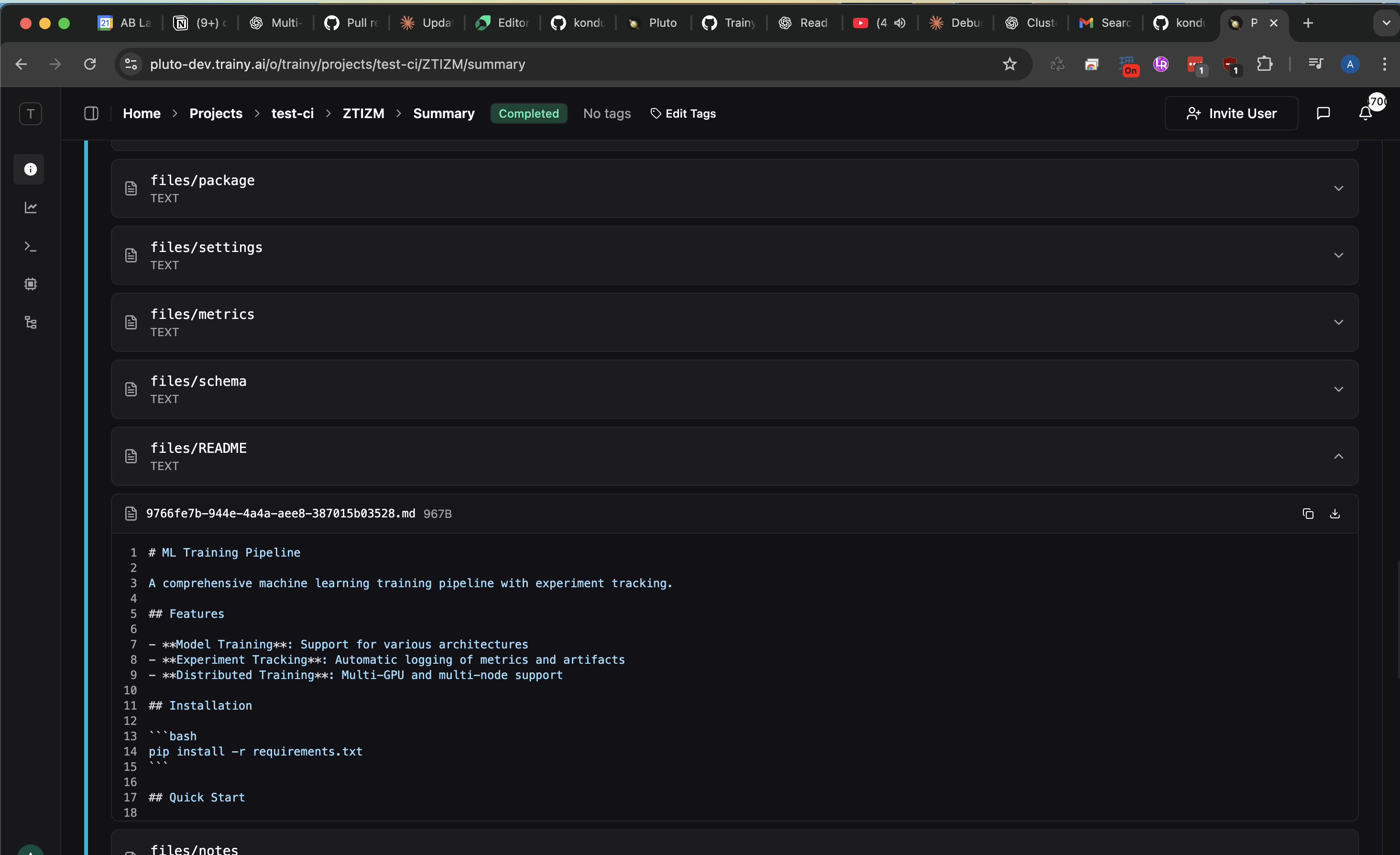 Plain text files will only render in dropdown if they are saved with a supported filename extension (i.e. .txt, .yaml, .py, etc.). For files that don't follow this convention, the file won't be viewable via the webUI but will still be downloadable.
## Use Cases
Common use cases for file logging include:
* **Configuration files**: Track the exact configuration used for each run
* **Output data**: Save predictions, embeddings, or other generated data
* **Logs and reports**: Save text logs or generated reports
## Related
For logging specific media types with built-in visualization support, see:
* [Images](/pluto/visualizations/images) - Log and visualize image data
* [Audio](/pluto/visualizations/audio) - Log and play back audio files
* [Video](/pluto/visualizations/video) - Log and view video files
Plain text files will only render in dropdown if they are saved with a supported filename extension (i.e. .txt, .yaml, .py, etc.). For files that don't follow this convention, the file won't be viewable via the webUI but will still be downloadable.
## Use Cases
Common use cases for file logging include:
* **Configuration files**: Track the exact configuration used for each run
* **Output data**: Save predictions, embeddings, or other generated data
* **Logs and reports**: Save text logs or generated reports
## Related
For logging specific media types with built-in visualization support, see:
* [Images](/pluto/visualizations/images) - Log and visualize image data
* [Audio](/pluto/visualizations/audio) - Log and play back audio files
* [Video](/pluto/visualizations/video) - Log and view video files