> ## Documentation Index
> Fetch the complete documentation index at: https://docs.trainy.ai/llms.txt
> Use this file to discover all available pages before exploring further.
# Run Lifecycle
> How jobs are scheduled?
```
konduktor launch my_job.yaml
```
What happens next? We manage the infrastructure and orchestration of your workloads. You can check the stage of your run using:
```
(konduktor) Andrews-MacBook-Air:konduktor asai$ konduktor status
User: asai-c41a
Jobs
NAME STATUS RESOURCES SUBMITTED START TIME END TIME
batch-job-160a FAILED 1x(2CPU, 2GiMEM, H100:8) 22 mins 08/08/25 04:11PM 08/08/25 04:20PM
batch-job-6fc9 PENDING 1x(2CPU, 2GiMEM, H100:8) 27 mins 08/08/25 04:06PM -
batch-job-873f COMPLETED 1x(2CPU, 2GiMEM, H100:8) 33 mins 08/08/25 04:00PM 08/08/25 04:25PM
```
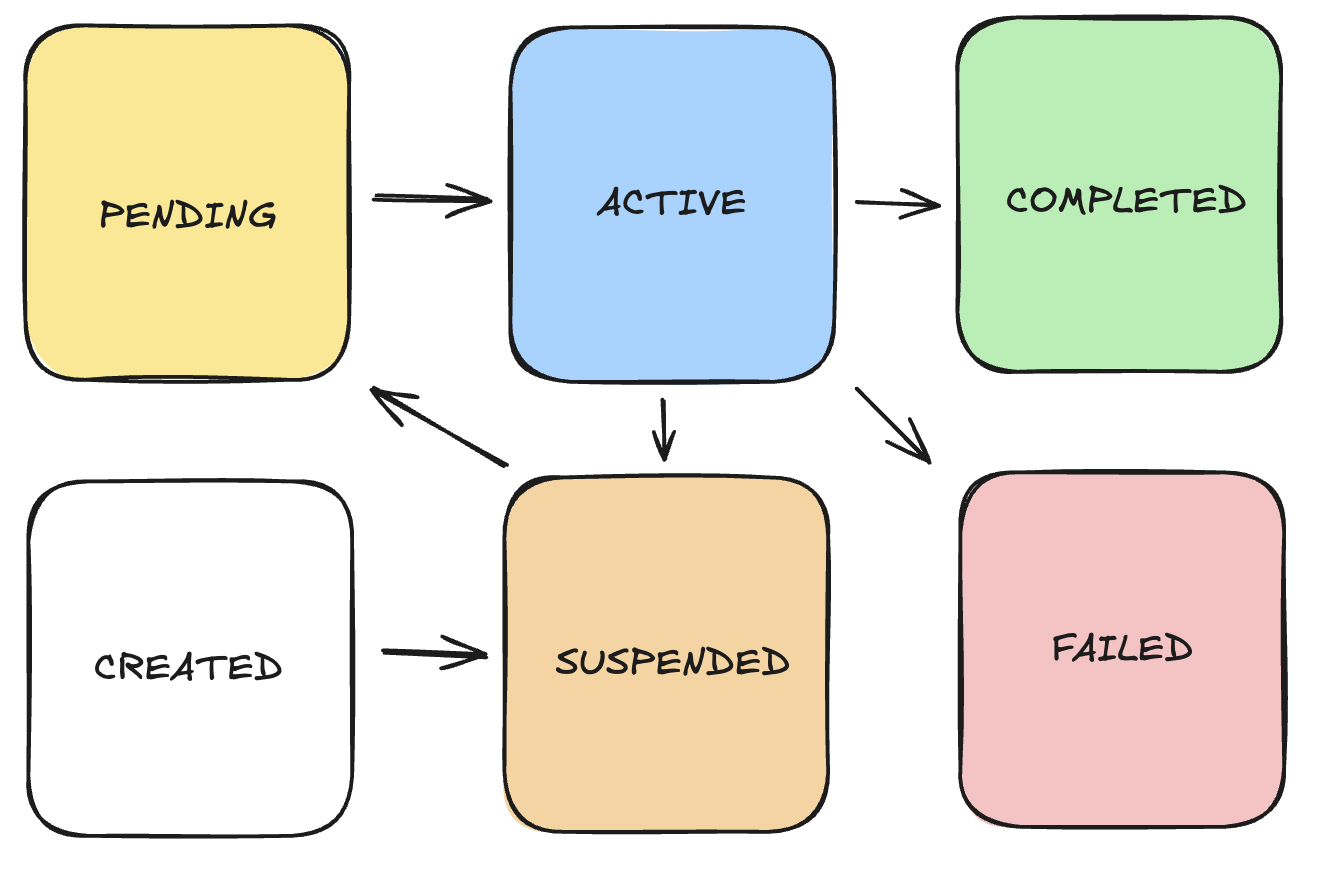 Shown above are the states of the job lifecycle. For on-demand users, billing is only compute when the workload is considered `ACTIVE`.
## CREATED
At this stage, the workload has been defined and all the pre-requisites to run the code have been uploaded to object storage from the workstation requesting the workload.
## PENDING
The workload has been accepted is either waiting for compute to finish being provisioned to fullfill the job requirements or for the containers to be pulled onto a new machine.
## SUSPENDED (by system)
The workload has either been newly created or pre-empted by higher priority workloads and is awaiting quota before being rescheduled.
## SUSPENDED (by user)
The workload was manually stopped by a user using `konduktor stop `. It can be unsuspended with `konduktor start `.
## ACTIVE
The workload is running and performing work. At the beginning of this stage, the workload will synchronize files defined under `file_mounts` and `workdir` definitions in the workload definition to the runner. Afterwards it will begin executing, the shell script defined under `run`
## COMPLETED
A terminal state indicating that the **all workers/nodes** in a workload have completed **successfully.**
## FAILED
A terminal state indicating that **at least one worker/node** in a workload has **failed**, either due to infrastructure/hardware faults are application errors.
Shown above are the states of the job lifecycle. For on-demand users, billing is only compute when the workload is considered `ACTIVE`.
## CREATED
At this stage, the workload has been defined and all the pre-requisites to run the code have been uploaded to object storage from the workstation requesting the workload.
## PENDING
The workload has been accepted is either waiting for compute to finish being provisioned to fullfill the job requirements or for the containers to be pulled onto a new machine.
## SUSPENDED (by system)
The workload has either been newly created or pre-empted by higher priority workloads and is awaiting quota before being rescheduled.
## SUSPENDED (by user)
The workload was manually stopped by a user using `konduktor stop `. It can be unsuspended with `konduktor start `.
## ACTIVE
The workload is running and performing work. At the beginning of this stage, the workload will synchronize files defined under `file_mounts` and `workdir` definitions in the workload definition to the runner. Afterwards it will begin executing, the shell script defined under `run`
## COMPLETED
A terminal state indicating that the **all workers/nodes** in a workload have completed **successfully.**
## FAILED
A terminal state indicating that **at least one worker/node** in a workload has **failed**, either due to infrastructure/hardware faults are application errors.