> ## Documentation Index
> Fetch the complete documentation index at: https://docs.trainy.ai/llms.txt
> Use this file to discover all available pages before exploring further.
# Serving Deployments (Experimental)
> Konduktor makes serving general and vLLM deployments easy
Experimental features are new and their interface and implementation may change at any time. Expect sharp edges.
Konduktor Serve is a powerful feature that simplifies deploying and managing ML models and general applications on Kubernetes. It provides two main deployment types:
**vLLM (Aibrix) Deployments**: Optimized for serving large language models with vLLM, featuring automatic horizontal scaling, tensor parallelism, and OpenAI-compatible API endpoints. For now, only single node inference is supported. Accessible at `.trainy.us`
**General Deployments**: Deploy any containerized application with automatic horizontal scaling and health checks. Accessible at `2.trainy.us`
## Launch a deployment
To launch a deployment, use the `konduktor serve launch` command shown below.
```
konduktor serve launch my_deployment.yaml
```
In this single command, Konduktor automatically creates the following resources:
* **Deployment:**
* App Deployment
* **Service:**
* App Service
* **PodAutoscaler: (optional)**
* KPA (Knative-based Pod Autoscaler)
* **Deployment:**
* App Deployment
* **Service:**
* App Service
* **PodAutoscaler: (optional)**
* HPA (Horizontal Pod Autoscaler)
Below is a basic, but incomplete deployment YAML to show the general idea of how to get started. The format is the same as `konduktor launch` task.yamls for jobs, except serving includes an extra section for replicas, ports, and health endpoint probing. For full, detailed examples of `deployment.yaml`, check out the bottom of this page.
```
name: incomplete-deployment-example
resources:
cpus: 4
memory: 32
accelerators: H100:1
...
# specific to konduktor serve
serving:
min_replicas: 1
max_replicas: 4
ports: 9000
probe: /health
run: |
...
```
## Check status
To view your deployments, use the `konduktor serve status` command.
Include `--all-users` or `-u` to see all deployments from all users in the cluster.
```
konduktor serve status
konduktor serve status --all-users
```
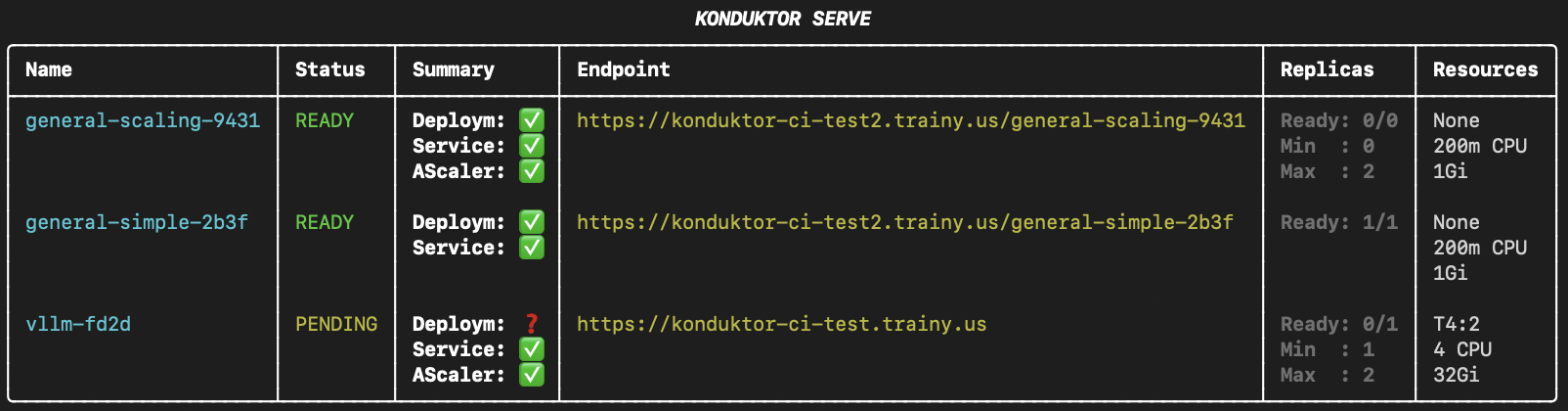 Optionally, use `--direct` to display direct IP endpoints instead of `trainy.us` endpoints.
```
konduktor serve status --direct
```
Alternatively to using `--direct` every time, you can modify `~/.konduktor/config.yaml` as a permanent toggle for `konduktor serve status --direct` with:
```
serving: # optional
endpoint: {trainy, direct} # defaults to trainy
```
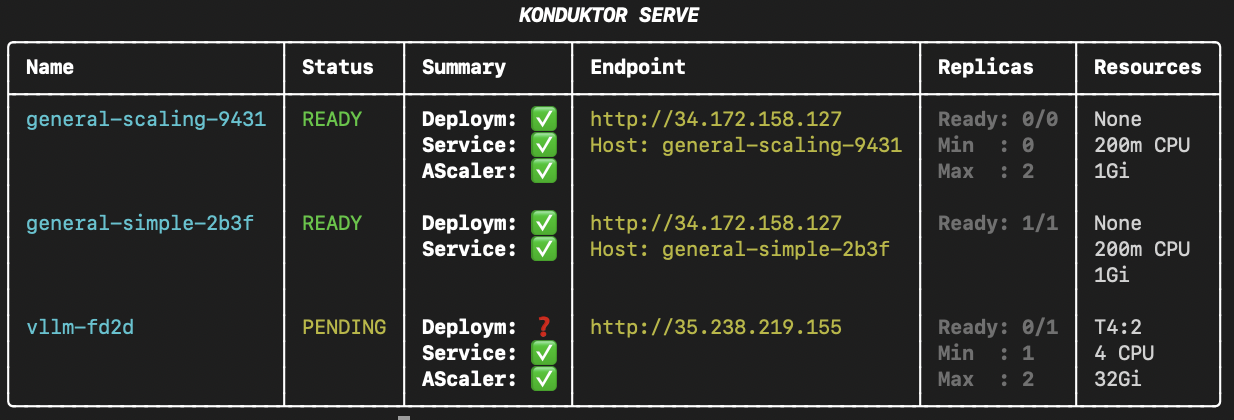
Optionally, use `--direct` to display direct IP endpoints instead of `trainy.us` endpoints.
```
konduktor serve status --direct
```
Alternatively to using `--direct` every time, you can modify `~/.konduktor/config.yaml` as a permanent toggle for `konduktor serve status --direct` with:
```
serving: # optional
endpoint: {trainy, direct} # defaults to trainy
```
 ## Down a deployment
To delete a deployment, use the `konduktor serve down` command.
Include `--all` or `-a` to down all deployments from all users in the cluster.
```
konduktor serve down
konduktor serve down --all
```
## Accessing Deployments
`trainy.us` endpoints use `https` while direct IP endpoints use `http`. Requests through `trainy.us` timeout after 60 seconds.
### vLLM (Aibrix)
Completion API:
```
# For trainy.us endpoint access:
curl https://.trainy.us/v1/completions \
-H "Content-Type: application/json" \
-d '{
"model": "",
"prompt": "San Francisco is a",
"max_tokens": 128,
"temperature": 0
}'
# For direct IP endpoint access:
curl http:///v1/completions \
-H "Content-Type: application/json" \
-d '{
"model": "",
"prompt": "San Francisco is a",
"max_tokens": 128,
"temperature": 0
}'
```
Output:
`top destination for tech companies, but it's also a hub for innovation and creativity.
So, it's no surprise that the city has a vibrant food scene. From the iconic Golden
Gate Bridge to the bustling streets of the Financial District, San Francisco offers
a unique blend of culture, history, and modernity. When it comes to food, the city is
known for its diverse cuisine, which reflects ...`
Chat Completion API
```
# For trainy.us endpoint access:
curl https://.trainy.us/v1/chat/completions \
-H "Content-Type: application/json" \
-d '{
"model": "",
"messages": [
{"role": "system", "content": "You are a helpful assistant."},
{"role": "user", "content": "Help me write a random number generator function in python"}
],
"max_tokens": 128
}'
# For direct IP endpoint access:
curl http:///v1/chat/completions \
-H "Content-Type: application/json" \
-d '{
"model": "",
"messages": [
{"role": "system", "content": "You are a helpful assistant."},
{"role": "user", "content": "Help me write a random number generator function in python"}
],
"max_tokens": 128
}'
```
Output:
`Okay, so I need to help write a random number generator function in Python. Hmm, where do I start? I remember that Python has a module called random which provides functions for generating random numbers. So maybe I should use that. Let me think about what functions are available there.\n\nFirst, there's random.randint(a, b), which returns a random integer N between a and b, inclusive. That's useful. Then...`
### General
Basic API:
```
# For trainy.us endpoint access:
curl https://.trainy.us/
# For direct IP endpoint access:
curl -H "Host: " http://
```
Output: `Hello from Konduktor Serve!`
Health Probe API
```
# For trainy.us endpoint access:
curl https://.trainy.us//health
# For direct IP endpoint access:
curl -H "Host: " http:///health
```
Output: `Hello from health probe!`
## Autoscaling
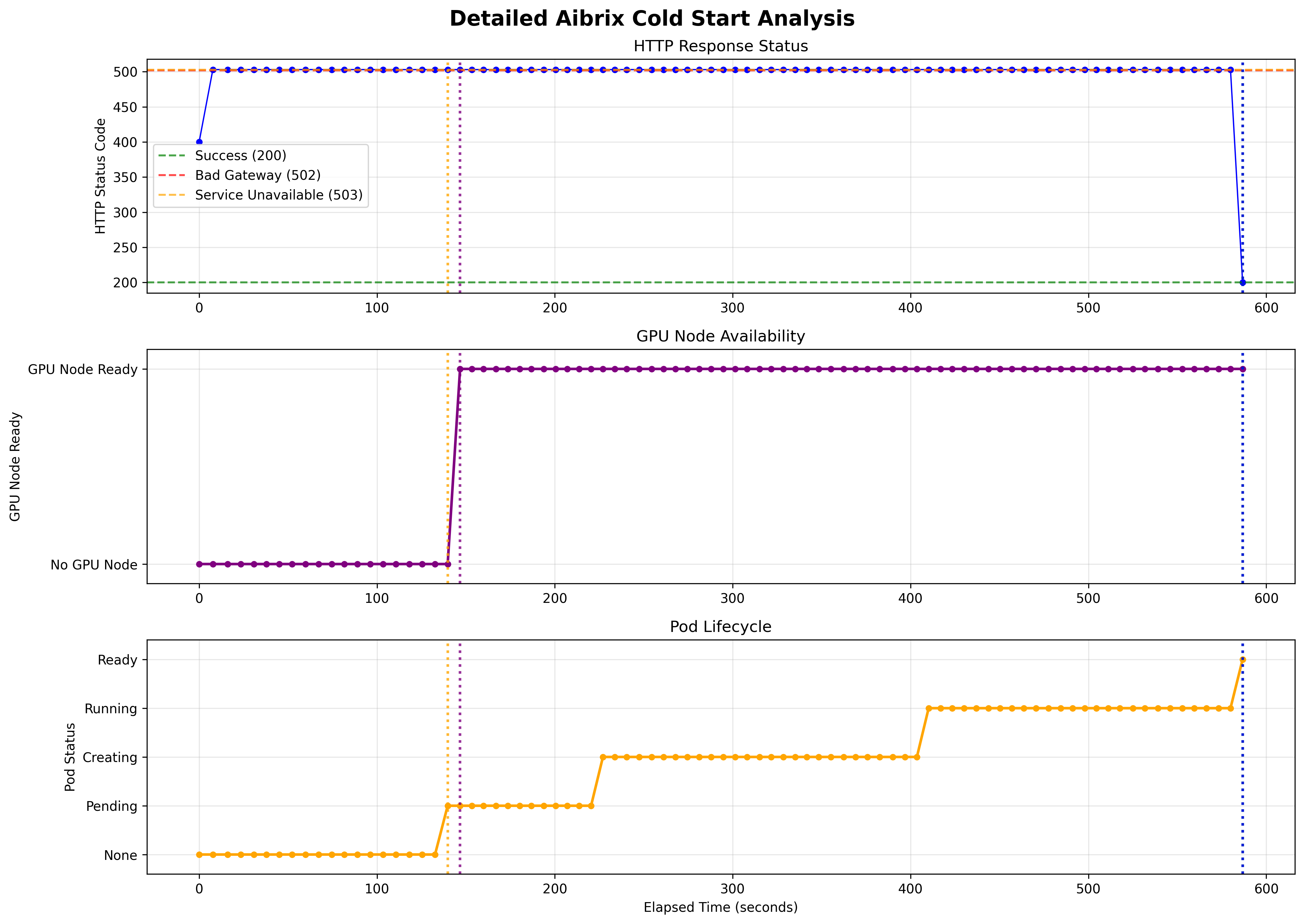
Use `konduktor serve status` to monitor the autoscaling process. The autoscaling process could take a few minutes, especially with a cold start from 0.
### Scale-Up Behavior
* **0 --> 1**: PA (Pod Autoscaler) triggers scale up immediately after the first request to the deployment endpoint.
* **1 --> N**: PA triggers scale up based on average request rate metrics collected over a 30-second window.
### Scale-Down Behavior
**vLLM (Aibrix) Deployments:** - stair-step scale-down
* **N --> N-1**: PA triggers scale down based on average request rate metrics collected over a 30-second window. Grace period of 30 mins **per pod**.
* **1 --> 0**: PA triggers scale down to zero replicas after 30 minutes of no requests to the model.
**General Deployments:** - fast scale-down
* **N --> 0**: PA triggers a direct scale down to zero replicas after 20 minutes of no requests to the deployment.
### GPU Scheduling Behavior
**Observed GKE Behavior:**
* GKE's GPU scheduling can be inefficient and may not always utilize nodes optimally.
* GKE spins up new nodes even when existing nodes have sufficient GPU capacity.
## Benchmarks
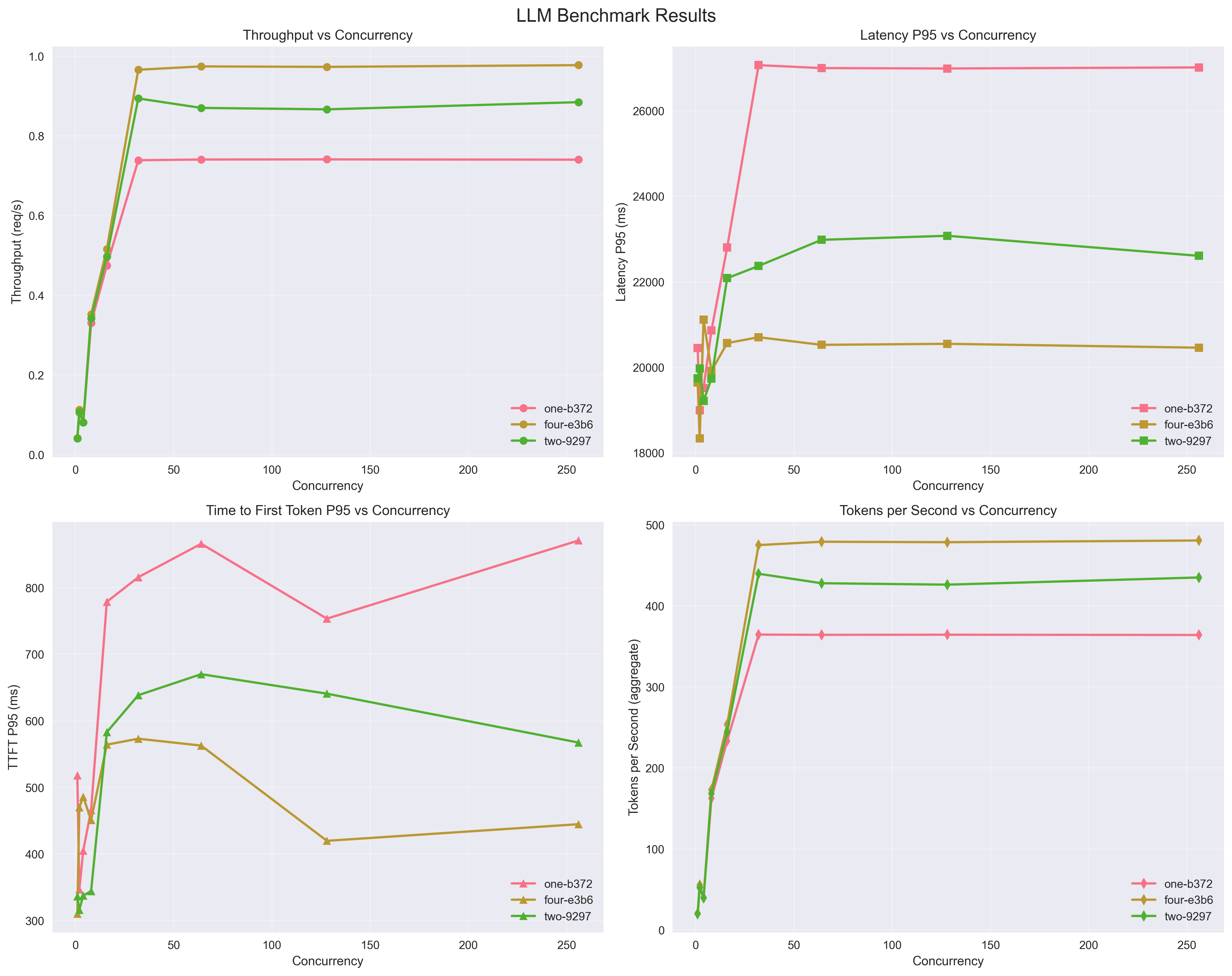
**vLLM (Aibrix) Deployments:**
Throughput/Latency/Tokens
## Down a deployment
To delete a deployment, use the `konduktor serve down` command.
Include `--all` or `-a` to down all deployments from all users in the cluster.
```
konduktor serve down
konduktor serve down --all
```
## Accessing Deployments
`trainy.us` endpoints use `https` while direct IP endpoints use `http`. Requests through `trainy.us` timeout after 60 seconds.
### vLLM (Aibrix)
Completion API:
```
# For trainy.us endpoint access:
curl https://.trainy.us/v1/completions \
-H "Content-Type: application/json" \
-d '{
"model": "",
"prompt": "San Francisco is a",
"max_tokens": 128,
"temperature": 0
}'
# For direct IP endpoint access:
curl http:///v1/completions \
-H "Content-Type: application/json" \
-d '{
"model": "",
"prompt": "San Francisco is a",
"max_tokens": 128,
"temperature": 0
}'
```
Output:
`top destination for tech companies, but it's also a hub for innovation and creativity.
So, it's no surprise that the city has a vibrant food scene. From the iconic Golden
Gate Bridge to the bustling streets of the Financial District, San Francisco offers
a unique blend of culture, history, and modernity. When it comes to food, the city is
known for its diverse cuisine, which reflects ...`
Chat Completion API
```
# For trainy.us endpoint access:
curl https://.trainy.us/v1/chat/completions \
-H "Content-Type: application/json" \
-d '{
"model": "",
"messages": [
{"role": "system", "content": "You are a helpful assistant."},
{"role": "user", "content": "Help me write a random number generator function in python"}
],
"max_tokens": 128
}'
# For direct IP endpoint access:
curl http:///v1/chat/completions \
-H "Content-Type: application/json" \
-d '{
"model": "",
"messages": [
{"role": "system", "content": "You are a helpful assistant."},
{"role": "user", "content": "Help me write a random number generator function in python"}
],
"max_tokens": 128
}'
```
Output:
`Okay, so I need to help write a random number generator function in Python. Hmm, where do I start? I remember that Python has a module called random which provides functions for generating random numbers. So maybe I should use that. Let me think about what functions are available there.\n\nFirst, there's random.randint(a, b), which returns a random integer N between a and b, inclusive. That's useful. Then...`
### General
Basic API:
```
# For trainy.us endpoint access:
curl https://.trainy.us/
# For direct IP endpoint access:
curl -H "Host: " http://
```
Output: `Hello from Konduktor Serve!`
Health Probe API
```
# For trainy.us endpoint access:
curl https://.trainy.us//health
# For direct IP endpoint access:
curl -H "Host: " http:///health
```
Output: `Hello from health probe!`
## Autoscaling
Use `konduktor serve status` to monitor the autoscaling process. The autoscaling process could take a few minutes, especially with a cold start from 0.
### Scale-Up Behavior
* **0 --> 1**: PA (Pod Autoscaler) triggers scale up immediately after the first request to the deployment endpoint.
* **1 --> N**: PA triggers scale up based on average request rate metrics collected over a 30-second window.
### Scale-Down Behavior
**vLLM (Aibrix) Deployments:** - stair-step scale-down
* **N --> N-1**: PA triggers scale down based on average request rate metrics collected over a 30-second window. Grace period of 30 mins **per pod**.
* **1 --> 0**: PA triggers scale down to zero replicas after 30 minutes of no requests to the model.
**General Deployments:** - fast scale-down
* **N --> 0**: PA triggers a direct scale down to zero replicas after 20 minutes of no requests to the deployment.
### GPU Scheduling Behavior
**Observed GKE Behavior:**
* GKE's GPU scheduling can be inefficient and may not always utilize nodes optimally.
* GKE spins up new nodes even when existing nodes have sufficient GPU capacity.
## Benchmarks
**vLLM (Aibrix) Deployments:**
Throughput/Latency/Tokens
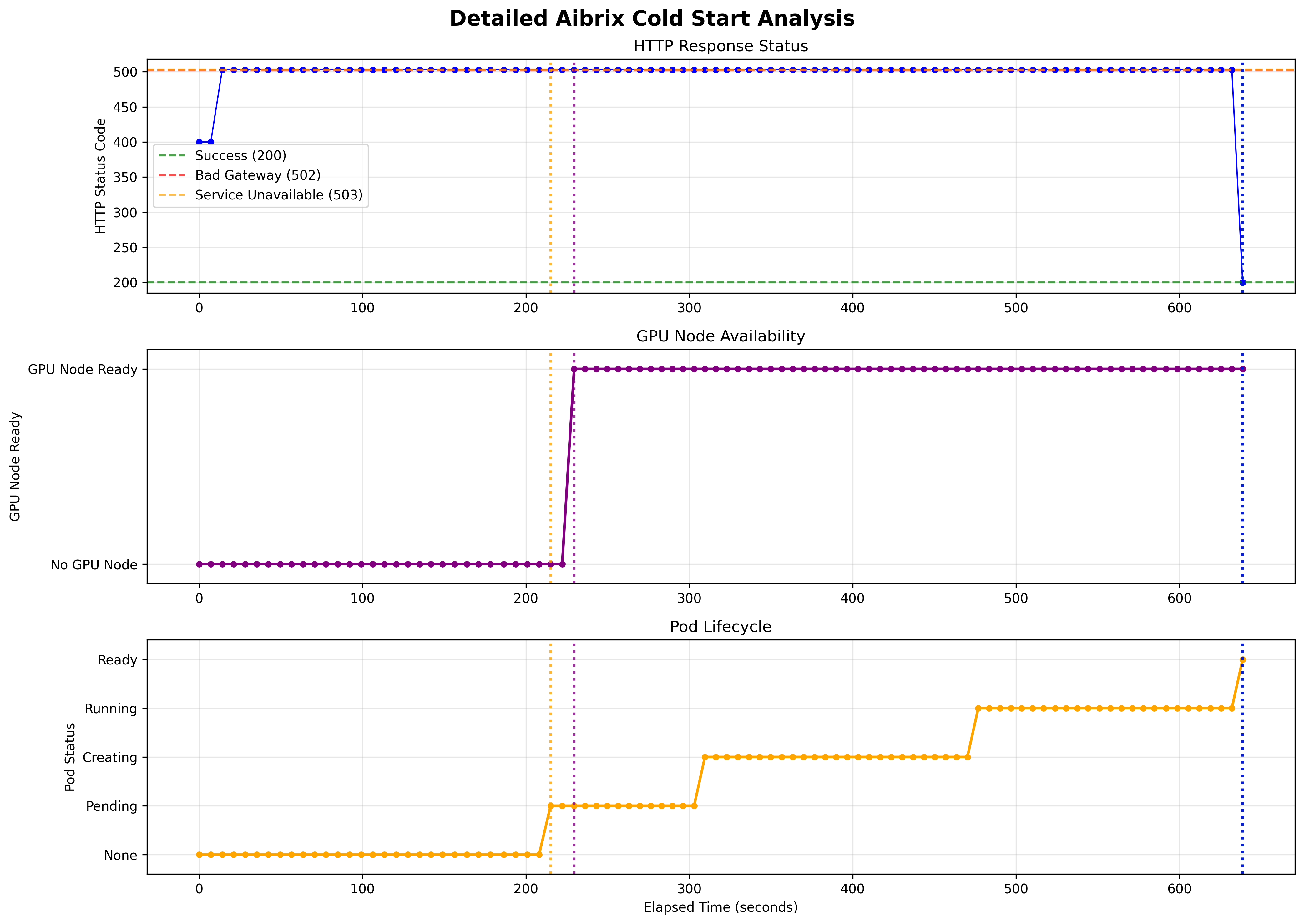
 Scale from 0 Cold Start Time (GKE GPUs), T4 and A100 respectively
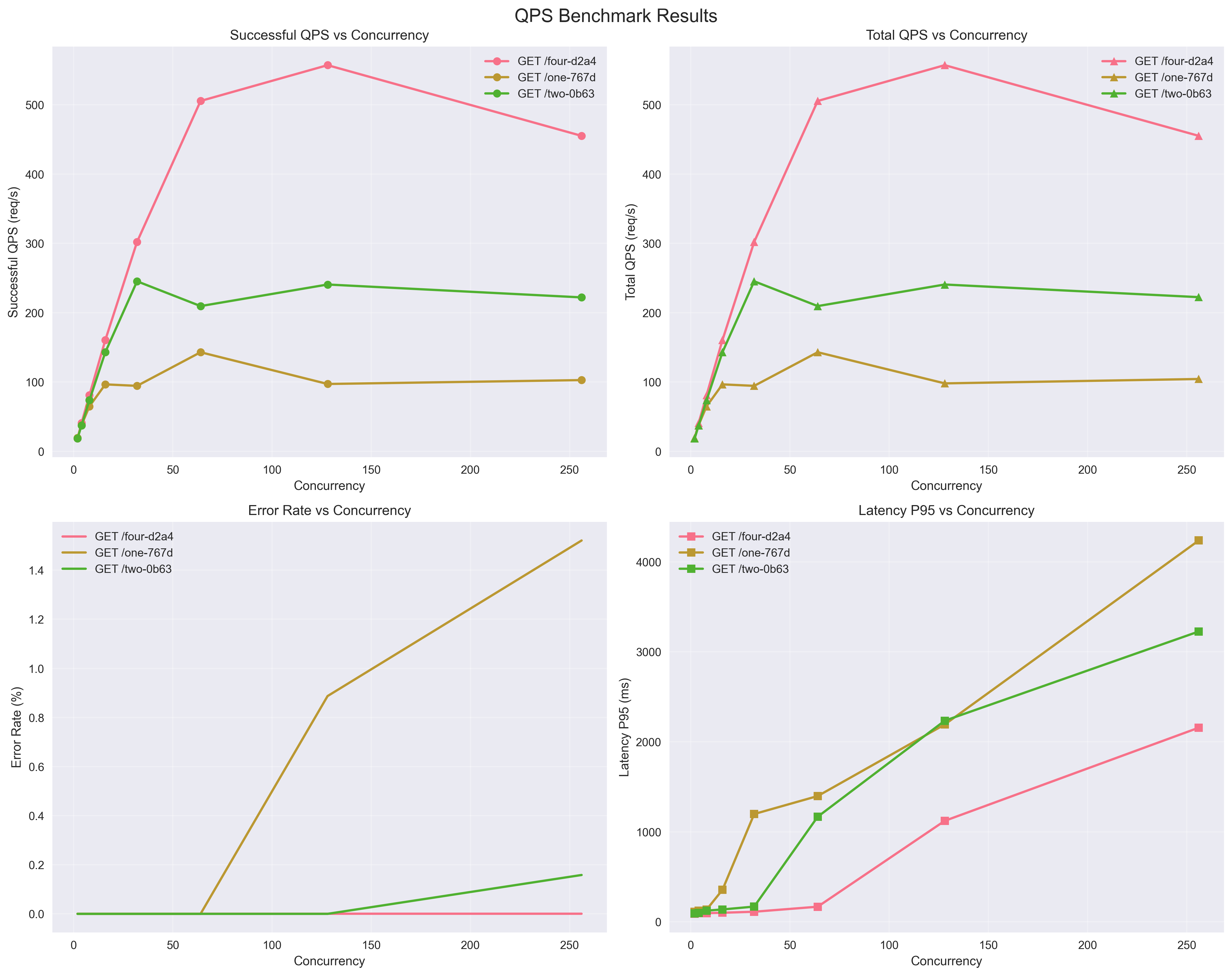
 **General Deployments:**
Throughput/Latency/Errors
**General Deployments:**
Throughput/Latency/Errors
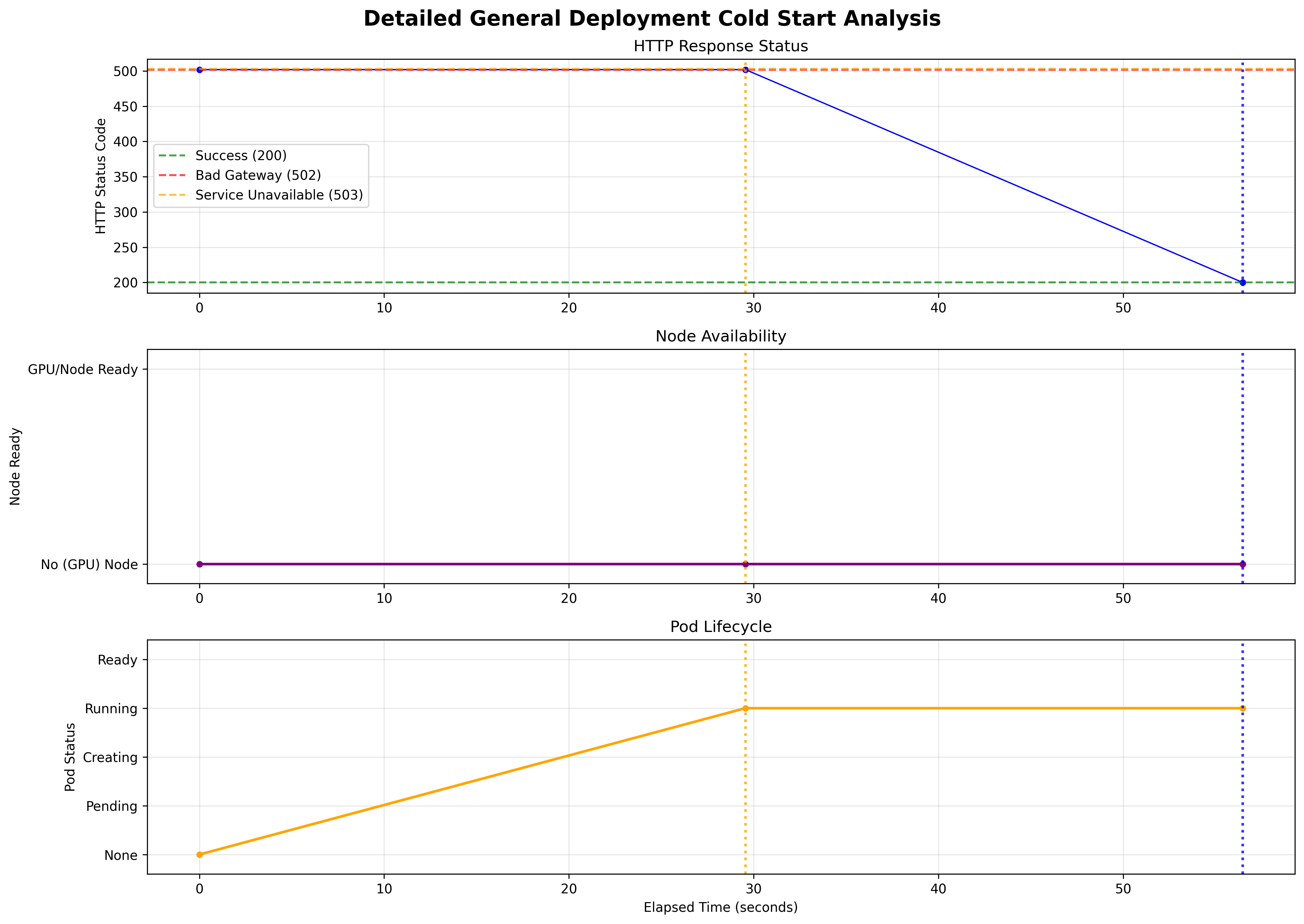
 Scale from 0 Cold Start Time (no GPUs)
 ## Example YAMLs
### Schema
* [Deployment Schema](/deployment-schema) - Complete reference for deployment.yaml fields
### General
* [Simple](/deployments/simple-general) (no autoscaling + default port (8000) + no health probing)
* [Complex](/deployments/complex-general) (autoscaling + custom port + custom health probing endpoint)
### vLLM (Aibrix)
* [Simple](/deployments/simple-vllm) (no autoscaling + default port (8000) + single GPU)
* [Complex](/deployments/complex-vllm) (autoscaling + custom port + multi GPU)
## Example YAMLs
### Schema
* [Deployment Schema](/deployment-schema) - Complete reference for deployment.yaml fields
### General
* [Simple](/deployments/simple-general) (no autoscaling + default port (8000) + no health probing)
* [Complex](/deployments/complex-general) (autoscaling + custom port + custom health probing endpoint)
### vLLM (Aibrix)
* [Simple](/deployments/simple-vllm) (no autoscaling + default port (8000) + single GPU)
* [Complex](/deployments/complex-vllm) (autoscaling + custom port + multi GPU)